


Introduction –
Serverless vs. Containers vs. VMs is an architectural decision that can significantly affect how modern applications are developed, deployed, secured, scaled, and maintained.
Cloud computing has given organizations more choices than ever when designing application infrastructure. Instead of deploying every application directly onto physical servers, development and infrastructure teams can choose between virtual machines (VMs), containers, serverless platforms, or combinations of all three.
Each approach solves a different set of problems.
Virtual machines provide strong isolation and control over the operating system and infrastructure environment. Containers provide portability, consistency, and efficient resource utilization. Serverless platforms abstract much of the underlying infrastructure and allow developers to focus primarily on application code.
The challenge is that there is no universal winner.
A high-performance enterprise application may benefit from VMs or containers. An event-driven workload may be an excellent candidate for serverless. A complex microservices platform may combine containers with serverless functions. A legacy application may continue to run efficiently on virtual machines.
The right architecture depends on workload characteristics, performance requirements, operational maturity, security needs, scalability, cost, and the amount of infrastructure control an organization requires.
Understanding the differences between Serverless vs. Containers vs. VMs helps technology leaders make architecture decisions based on business and technical requirements rather than simply following the latest cloud trend.
Understanding the Three Architecture Models –
Before comparing the three approaches, it is useful to understand what each one actually provides.
- Virtual Machines –
Virtual machines emulate complete computing environments on physical servers using a hypervisor.
Each VM typically includes:
- Operating system
- Runtime environment
- Libraries
- Applications
- System configurations
Multiple virtual machines can run on the same physical server while remaining logically isolated.
VMs provide organizations with significant control over the operating system and infrastructure environment.
- Containers –
Containers package an application together with its dependencies into a portable execution environment.
Unlike VMs, containers generally share the host operating system kernel while maintaining process-level isolation.
Popular container technologies include Docker and container orchestration platforms such as Kubernetes.
Containers are particularly useful for microservices, distributed applications, CI/CD pipelines, and environments where application portability is important.
- Serverless –
Serverless computing abstracts much of the underlying infrastructure from application developers.
Developers typically deploy application functions or services without managing the underlying servers directly.
The cloud provider handles infrastructure provisioning, scaling, and much of the operational management.
Serverless is particularly effective for event-driven workloads, APIs, automation, background processing, and applications with variable traffic.
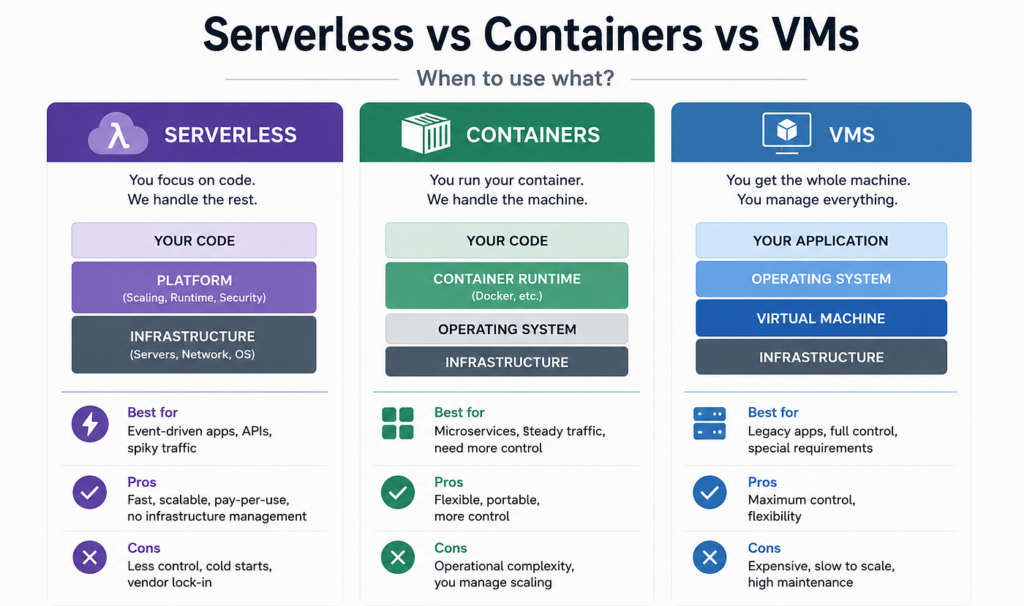
Serverless vs. Containers vs. VMs: Core Comparison –
| Feature | Virtual Machines | Containers | Serverless |
|---|---|---|---|
| Infrastructure Control | High | Medium to High | Low |
| Operational Responsibility | High | Medium | Low |
| Startup Time | Slower | Fast | Very Fast to Variable |
| Resource Efficiency | Moderate | High | High for suitable workloads |
| Scaling | Manual/Automated | Automated | Highly automated |
| Billing Model | Often resource-based | Resource-based | Usually usage-based |
| Portability | Moderate | High | Lower |
| OS Control | Full | Limited by host | Minimal |
| Best For | Legacy and specialized workloads | Microservices and platforms | Event-driven workloads |
| Management Complexity | High | Medium | Low to Medium |
Virtual Machines: Maximum Control and Flexibility –
Virtual machines remain an important part of modern infrastructure despite the growth of containers and serverless technologies.
One of their biggest advantages is control.
Organizations can choose operating systems, install specific libraries, configure networking, manage security settings, and control the runtime environment.
This makes VMs particularly useful for applications with specialized operating system requirements or workloads that were not designed for cloud-native environments.
For example, an organization running a legacy enterprise application may find that migrating it directly into a VM-based cloud environment is simpler and less risky than redesigning it as a containerized or serverless application.
Advantages of Virtual Machines –
VMs offer several important benefits.
- Strong Isolation – Each virtual machine operates within its own operating system environment, providing a strong level of isolation.
- Infrastructure Control – Teams can configure operating systems, networking, storage, and software environments in detail.
- Legacy Application Compatibility – Applications that require traditional server environments can often run without significant architectural changes.
- Predictable Performance – Dedicated or appropriately sized VM resources can provide predictable performance characteristics.
Limitations of Virtual Machines –
The major disadvantage is operational overhead.
Teams are responsible for managing operating systems, security patches, updates, capacity planning, monitoring, backups, and other infrastructure tasks.
VMs can also consume more resources because each instance generally requires its own operating system.
For organizations seeking highly automated, cloud-native environments, this additional management can become a significant burden.
Containers: The Middle Ground –
Containers occupy an interesting position between VMs and serverless.
They provide more infrastructure control than serverless while requiring less overhead than traditional VMs.
A container packages application code and dependencies into a standardized unit that can run consistently across development, testing, and production environments.
This portability is one of the biggest reasons containers became popular.
A developer can build a container locally, test it in a CI/CD environment, and deploy the same container image to a cloud-based production cluster.
“Containers make applications portable. Serverless makes infrastructure invisible. Virtual machines make infrastructure controllable.”
Why Organizations Use Containers –
Containers are particularly useful for organizations adopting microservices architectures.
Instead of building one large application, companies can divide applications into smaller services.
For example, an e-commerce application could have separate services for:
- User authentication
- Product catalog
- Shopping cart
- Payments
- Order management
- Notifications
- Recommendations
Each service can run independently inside containers.
This allows teams to deploy, scale, and update individual components without necessarily redeploying the entire application.
Advantages of Containers –
- Portability – Container images can run across different environments with fewer compatibility problems.
- Efficient Resource Usage – Containers typically require fewer resources than complete VMs.
- Microservices Support – Containers are well suited to distributed application architectures.
- Deployment Consistency – The same container image can move through development, testing, staging, and production.
- Scalability – Container orchestration platforms can automatically scale workloads based on demand.
Challenges of Containers –
Containers do not eliminate infrastructure management.
Organizations still need to manage:
- Container orchestration
- Networking
- Security
- Monitoring
- Storage
- Service discovery
- Cluster upgrades
- Resource allocation
Kubernetes, for example, provides powerful orchestration capabilities but can introduce significant operational complexity.
For smaller teams, managing a large container platform may be unnecessary if a simpler serverless or managed platform can satisfy the workload requirements.
Serverless: Focus on Code Instead of Servers –
Serverless computing takes infrastructure abstraction further.
Developers deploy functions or application services, while the cloud provider manages much of the underlying infrastructure.
A serverless application might execute code when:
- A user submits an API request
- A file is uploaded
- A database record changes
- A scheduled event occurs
- A message enters a queue
- A transaction is completed
This event-driven architecture can be highly efficient for workloads that do not require continuously running application servers.
Advantages of Serverless –
- Automatic Scaling – Serverless platforms can automatically scale execution based on incoming demand.
- Reduced Infrastructure Management – Developers do not typically need to manage operating system patches, server provisioning, or cluster capacity.
- Usage-Based Costs – For suitable workloads, organizations can pay primarily for actual execution rather than continuously running infrastructure.
- Faster Development – Teams can focus on application logic instead of infrastructure provisioning.
- Event-Driven Design – Serverless is naturally suited to asynchronous and event-driven applications.
Challenges of Serverless –
Serverless is not suitable for every application.
One concern is vendor dependency.
Applications designed around provider-specific serverless services may become difficult to migrate between cloud providers.
Another consideration is cold-start latency. Depending on the platform and workload, functions may experience additional startup latency when they have not been recently executed.
Serverless applications can also become complex when they involve many functions, events, permissions, queues, databases, and external services.
Monitoring and troubleshooting distributed serverless systems can require specialized tooling and skills.
Serverless vs. Containers vs. VMs: Cost Considerations –
Cost is one of the most misunderstood aspects of cloud architecture.
There is no universally cheapest architecture.
VMs may be cost-effective for workloads that run continuously and predictably.
Containers can improve resource utilization by allowing multiple workloads to share infrastructure efficiently.
Serverless can be highly cost-effective for workloads with unpredictable or intermittent traffic because organizations generally pay based on usage.
However, high-volume, continuously running workloads can sometimes become more expensive on serverless platforms than on appropriately optimized containers or VMs.
Organizations should therefore analyze workload behavior rather than assuming that serverless automatically means lower costs.
“Modern architecture is not about choosing the newest technology. It is about choosing the simplest technology that solves the problem effectively.”
Conclusion –
Serverless vs. Containers vs. VMs is not a competition with one universal winner.
Virtual machines provide control, isolation, and compatibility. Containers provide portability, efficient resource utilization, and strong support for microservices. Serverless provides infrastructure abstraction, automatic scaling, and a highly efficient model for suitable event-driven workloads.
The best architecture depends on the application.
Organizations should evaluate workload duration, traffic patterns, performance requirements, security responsibilities, operational capabilities, cost, portability, and legacy dependencies before making a decision.
In many modern environments, the best solution will be a combination of architectures.
The objective should not be to migrate everything to serverless, containerize every application, or eliminate VMs.
The objective should be to build an architecture where each workload runs on the platform that provides the right balance of performance, cost, scalability, security, control, and operational simplicity.